

Offline school management software is a program installed on a school's own computer that runs fees, admissions, attendance and exams without internet. It suits a single-office school with unreliable internet that wants a one-time cost and its data on its own premises. Choose cloud software instead if parents need a mobile app, or if staff must work from several buildings or from home.
A note before you read: we make NeoSchool, an offline school management software for Windows, so we are not a neutral reviewer. For that reason this guide also says plainly when offline is the wrong choice, and it lists the limits of our own product.
What is offline school management software?
It is a desktop program, installed like any other Windows application. Your school's records sit in a database on that computer's disk. Staff can collect fees, print a TC or enter marks whether or not the internet is working.
Cloud software works the other way round. It runs on the vendor's servers, and your staff reach it through a browser or an app, so it needs a working connection. One 2026 Indian comparison lists weak offline support among the drawbacks of some well-known cloud products, and that gap is what offline software fills.
Some products call themselves "hybrid" or "offline-capable" but only keep a few features working during an outage. If offline matters to you, ask exactly which tasks work without internet. Question 1 below shows how to test this in a demo.
Offline vs cloud school software: the real differences
| What matters | Offline (desktop) | Cloud (online) |
|---|---|---|
| Internet needed | No, for daily work | Yes, in most products |
| Where data is kept | On the school's computer | On the vendor's servers |
| Typical pricing | Often a one-time licence | Usually a yearly or monthly fee |
| Speed at the fee counter | Does not depend on the connection | Depends on the connection |
| Backups | The school's responsibility | Handled by the vendor; ask how |
| Parent mobile app | Usually not available | Usually available |
| Online fee payment by parents | Usually not available | Usually available |
| Access from home or a second branch | Usually not available | Yes |
| If the vendor shuts down | The software usually keeps running on your PC | Access may end; check the exit terms |
This table compares the two approaches in general, and individual products differ. Neither column is simply better. Offline gives you control and predictable cost. Cloud gives you reach. The right pick depends on how your school actually works day to day.
Which schools should choose offline software?
Offline is usually the better fit if:
- Your internet drops during the working day, or your area has weak coverage.
- Fees, admissions and printing all happen from one office computer.
- You want a fixed, one-time cost instead of a yearly bill.
- Your management wants student data to stay on the premises.
- Your main need is to replace registers and Excel sheets, not to build a parent app.
Choose cloud software instead if:
- Parents expect to see attendance, homework or fees on their phones.
- You want parents to pay fees online through the software.
- Teachers will enter attendance or marks from their own phones.
- You run several branches that need one shared set of records.
- No one at the school can be trusted to look after backups.
That last point decides more cases than people expect. A school with no one to own this job is often safer on a good cloud product, however reliable its internet is.
What does school software really cost over five years?
Comparing the first-year price is the most common mistake. A yearly fee looks small, but you pay it for as long as you use the software. Codingclave's 2026 guide says cloud options for small schools start from ₹12,000 to ₹30,000 a year, while E-Cybertech's quotes ₹2,000 to ₹5,000 a month. Both companies sell school software too, so treat these as a starting point and get written quotes.
Here is the plain arithmetic at the low end, ₹12,000 a year, with no price rises. The one-time figure is NeoSchool's regular price, used as an example of a one-time licence.
| Years used | ₹12,000 yearly plan | ₹16,999 one-time licence |
|---|---|---|
| 1 year | ₹12,000 | ₹16,999 |
| 2 years | ₹24,000 | ₹16,999 |
| 3 years | ₹36,000 | ₹16,999 |
| 5 years | ₹60,000 | ₹16,999 |
Work it out with your own quote
Move the sliders to match the yearly price you were quoted.
Offline has costs of its own, and an honest budget includes them:
- A working Windows computer, which most school offices already have.
- A UPS, so a power cut does not interrupt work while data is being saved.
- Two pen drives or an external disk for backup copies.
- Paid support, if the vendor charges for it. Ask about yearly maintenance (AMC) fees, because they can turn a one-time price into a yearly one.
How to keep offline school data safe
With offline software, your data is only as safe as your backup habit. A computer can be stolen, a disk can fail and a virus can spread. Copies on the same computer will not save you from any of these. These four rules cover most of the risk:
- Back up automatically. Choose software that makes a backup every day without anyone remembering to do it.
- Keep one copy off the computer. Once a week, copy the latest backup to a pen drive. Do this after fee-heavy days as well.
- Keep that pen drive somewhere else. A copy in the same room can be lost in the same theft or fire. Give it to the principal or owner.
- Password-protect the copy and test it. A pen drive with student records can get lost. Lock the copy, and try restoring it once a term so you know it works.
Student data needs care. Records can include Aadhaar numbers, dates of birth and parents' phone numbers. Give each office staff member their own login, lock the computer when leaving the desk, and treat any exported file as carefully as the register itself.
Does offline software work with UDISE+, PEN and APAAR?
Offline software can prepare the data, but it cannot replace the government portal. According to Careers360's UDISE+ guide, only school authorities can log in to the portal, and they enter student details in its Student Module. A student's PEN is created when their details are first registered there.
Accuracy matters most. Education for All in India reports that APAAR ID generation relies on the student's name, date of birth and gender matching Aadhaar, and that a mismatch is the usual reason it fails. So useful software helps in three ways:
- It has fields for the PEN, APAAR ID and other UDISE+ profile details on the admission form.
- It keeps one correct copy of each student's details, instead of several Excel files that disagree.
- It can export student data in a format your UDISE+ coordinator can work from.
Rules and deadlines change each session, so always confirm them on the official UDISE+ portal or with your Block MIS coordinator. Be wary of any vendor who says their software files UDISE+ for you, and ask them to show it.
10 questions to ask before you buy
Ask these of any vendor, including us. A confident vendor will answer them in the demo, using the real software.
- Can you switch off the Wi-Fi now and collect a fee? This is the quickest way to find out what "offline" really means.
- Is this a one-time price, and what do I pay in year two? Get AMC, renewal and update charges in writing.
- What happens if I stop paying? Find out if the software locks, and whether you can still reach your records.
- Can I export all my data to Excel myself? Your records should never be trapped inside a product.
- How are backups made, and can you show me a restore? A backup is only proven when it comes back.
- Can you import my existing student list from Excel? Retyping hundreds of records is where projects stall.
- Will your receipts, TC and report cards print in my format? Ask for samples, in Hindi if you need it, and check your board's format.
- Can the office run it without a computer expert? Let your own accountant try it during the demo.
- Who answers when something breaks during admissions? Ask for a phone number, hours, and the language of support.
- What does this software not do? An honest vendor will tell you. If the answer is "nothing", be careful.
Where NeoSchool fits
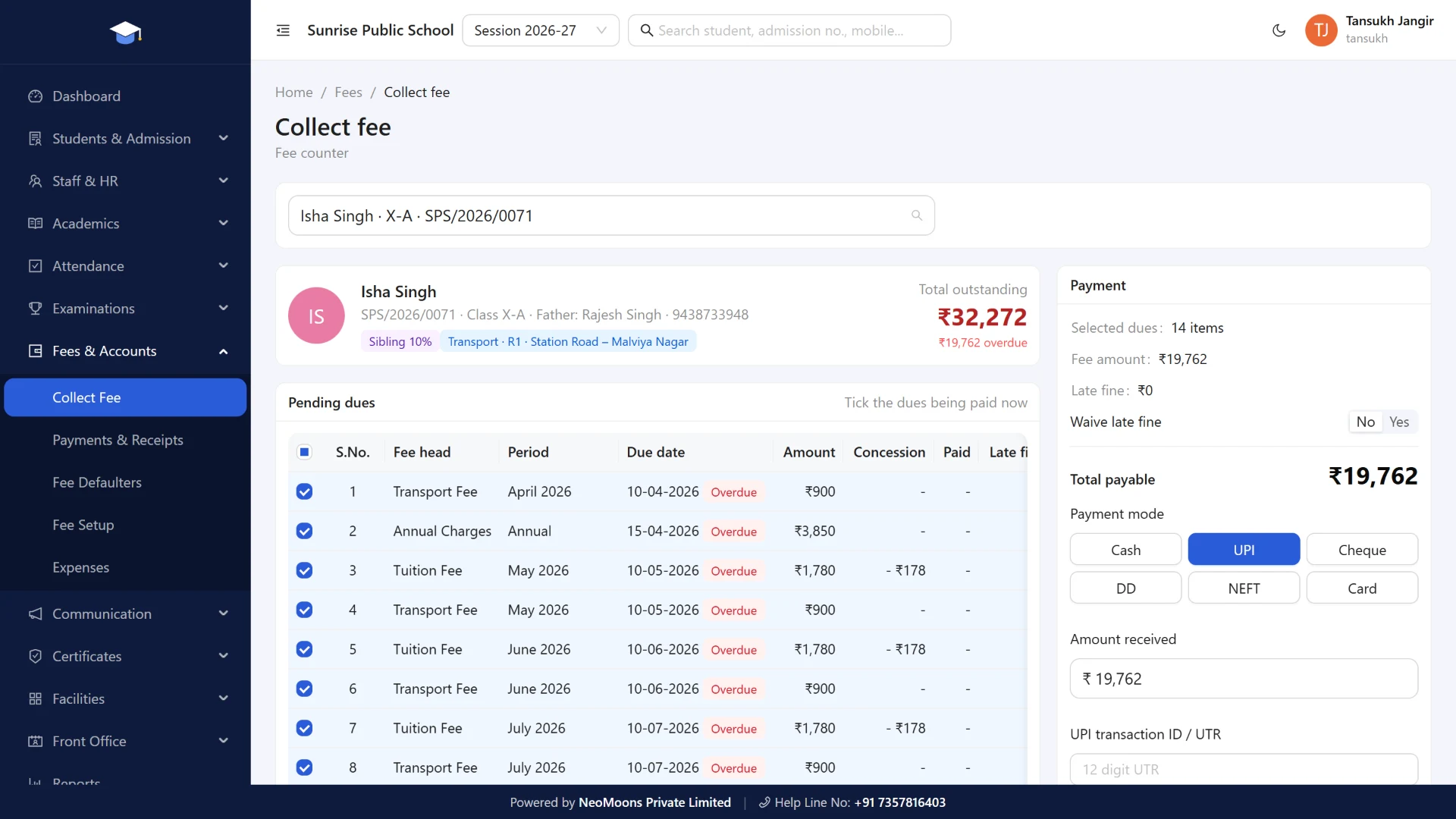
NeoSchool is our offline school management software for Indian schools. It runs on Windows 10 and 11 and works with no internet. We wrote the product details below from the software itself, not from a sales sheet.
What it does well
- 16 modules in one app: admission, fees, attendance, exams and report cards, staff and payroll, TC and certificates, ID cards, transport, hostel and library.
- Data safety: an automatic daily backup, a backup before every update, and pen drive copies with an optional password.
- Hindi and English printing: receipts, TC, certificates, report cards and admit cards.
- UDISE+ support: UDISE+ fields on the admission form, including PEN and APAAR ID, and a student data download in UDISE+ profile columns.
- One-time price: ₹16,999, with a launch offer of ₹9,999 for the first 10 schools, lifetime validity and no yearly maintenance fee.
What it does not do
- It runs on one Windows computer, and sharing over an office network is not available yet.
- There is no parent or teacher mobile app.
- It does not send SMS or WhatsApp messages, and parents cannot pay fees online through it.
- It does not upload to the UDISE+ portal. Your coordinator still does that work on the portal.
If those limits are deal-breakers, a cloud product will serve you better. If they are not, you may never need to pay a yearly software bill again.
हिंदी में सारांश
ऑफलाइन स्कूल मैनेजमेंट सॉफ्टवेयर स्कूल के अपने कंप्यूटर पर चलता है, इसलिए फीस, एडमिशन, हाजिरी और परीक्षा का काम बिना इंटरनेट के होता है। यह उन स्कूलों के लिए अच्छा है जहाँ इंटरनेट भरोसेमंद नहीं है, काम एक ही ऑफिस से होता है और जो हर साल फीस नहीं देना चाहते। अगर अभिभावकों के लिए मोबाइल ऐप चाहिए, तो क्लाउड सॉफ्टवेयर बेहतर रहेगा। ऑफलाइन सॉफ्टवेयर में बैकअप की ज़िम्मेदारी स्कूल की होती है, इसलिए हर हफ्ते पेन ड्राइव में कॉपी ज़रूर रखें।
Frequently asked questions
What is offline school management software?
It is a program installed on a computer at the school that runs fees, admissions, attendance, exams and records without needing internet. The data is stored on that computer, not on a company's server.
Can school software work without internet?
Yes, if it is built as a desktop program. Check by turning off the Wi-Fi during the demo and collecting a fee. Many cloud products stop working or offer only limited offline features.
Is offline school software safe?
It can be, but safety becomes the school's job. The computer needs a login password, and backups must be copied off it regularly. If the only copy is on one computer, a theft or disk failure can lose everything.
Can parents use an app with offline software?
Usually not. A parent app needs a server on the internet, so a school that wants parents to pay fees or see attendance on their phones should choose cloud software.
Does offline software replace the UDISE+ portal?
No. Only school authorities can log in to UDISE+, and that work still happens on the official portal. Good software helps by keeping student details clean and ready.
How much does offline school software cost in India?
It varies by vendor, and many offline products charge once rather than every year. NeoSchool costs ₹16,999 one time, with a launch offer of ₹9,999 for the first 10 schools and no yearly maintenance fee.
How we wrote this guide
Product details come from NeoSchool's own software, which we build. Prices and UDISE+ details come from the sources linked above, which are third-party guides and not official notices. We prepared this guide with AI writing assistance. If something here is out of date, email us and we will correct it.